Tales from the Terminal Room

February 2007 , Issue No. 77

Home About RBA Business Resources Search Strategies for the Internet Tales from the Terminal Room Training Contact Us

Please Note: This is an archive copy of the newsletter. The information and links that it contains are not updated.


Printer Friendly Version Printer friendly version

PDF PDF version
(134 KB)

Archives


Creative Commons License.

Tales from the Terminal Room ISSN 1467-338X
February 2007, Issue No. 77
Editor: Karen Blakeman
Published by: RBA Information Services


Tales from the Terminal Room (TFTTR) is a monthly newsletter, with the exception of July and August , which are published as a single issue. TFTTR includes reviews and comparisons of information sources and search engines; updates to the RBA Web site Business Sources and other useful resources; dealing with technical and access problems on the Net; and news of RBA's training courses and publications. Many of the articles included in TFTTR will already have appeared in Karen Blakeman's blog at http://www.rba.co.uk/rss/blog.htm.

Tales from the Terminal Room can be delivered via email as plain text or as a PDF with active links. You can join the distribution list by going to http://www.rba.co.uk/tfttr/index.shtml and filling in the form. You will be sent an email asking you to confirm that you want to be added to the list. TFTTR is also available as an RSS feed. The URL for the feed is http://www.rba.co.uk/rss/tfttr.xml


In this issue 

  • Search Tools
    • Ask X
    • Lack of overlap in search engines
    • Update on CrossEngine
  • Top Search Tips from Wales
  • Blog move from Blogger to Wordpress
  • Internet Librarian International 2007 - Call for Speakers
  • Information Resources
    • HotFrog Business Directories
    • Intute Subject Booklets
  • Meetings and Workshops
    • Assessing the Quality of Information, London
    • Advanced Internet Search Strategies, Manchester
    • Business Information: Key Web Resources, London


Search Tools

Ask X

Ask.com has just automatically redirected me to what seems to be a test version of a new interface called Ask X (http://www.askx.com/). My first impression of the Spartan home page is that I do not like it at all. The menu of search options - news, images, blogs and feeds etc. - that normally appears on the right hand side of the screen has gone. All you have is a single search box. Phil Bradley and I have already argued the case for leaving tabs such as these on the home page with Accoona (http://philbradley.typepad.com/phil_bradleys_weblog/accoona/index.html ), who soon after restored them. I do not want to have to do a two step process to carry out, for example, a blog or news search. Some of the options for the other resources reappear on the Ask X results page, but to have to carry out an 'all' search first annoys me.

Ask X home page

ASK X Home Page

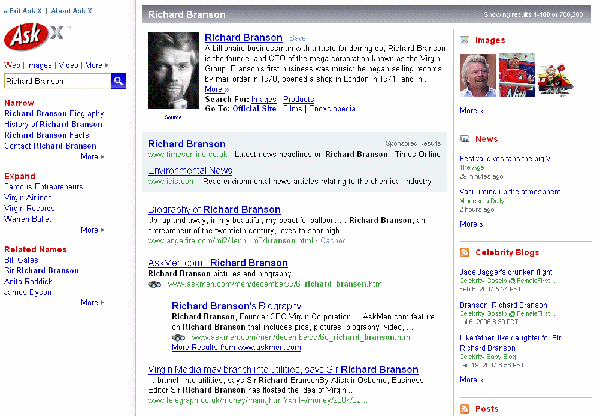
I do like the three panel results screen, though. The left hand panel includes a search box together with links to some of the specialist resources, and the Zoom options (Narrow, Expand, Related Names). It also contains search suggestions that change as you type.

The middle panel contains your search results and on the right panel there are sample results from other types of resources including video, news, images, blogs and encyclopedia. For those who do not think beyond standard web page searching they are a reminder of other, possibly more relevant forms of information. Overall, I like Ask X but please, guys, leave the specialist search links on the home page.

Ask X results screen

ASK X results screen


Lack of overlap in search engines

Greg Notess has come across two examples of why we need to use more than one search tool and why Google is not always best. In his recent posting Page Found at 3 or 6: Not Google (http://www.searchengineshowdown.com/blog/2007/02/page_found_at_3.shtml) he shows that a web page he could not find in Google - a page on a Canadian academic site that has existed since at least 2003 - was indexed by Yahoo!, Gigablast, and Exalead, but not by Google, Live, or Ask.

In Conflicting Overlap (http://www.searchengineshowdown.com/blog/2007/02/conflicting_overlap.shtml) he looks at how well the search engines covered the personal pages that people create in a social networking site such as LibraryThing. Both articles are accompanied by short screencasts hosted on YouTube and neatly demonstrate how video and audio can be used in demonstrations and as teaching tools.

Update on CrossEngine

A few hours after I had blogged my comments (http://www.rba.co.uk/rss/2007/01/crossengine.html) on CrossEngine (http://www.crossengine.com/) Greg Notess of Search Engine Showdown emailed me asking if we in the UK were seeing a different version from people in the US. My screen shot was different from what he was seeing on his screen. A quick check confirmed that CrossEngine had already made changes to the interface. The Formats tab has gone and the filetype search has been included under the Web tab (the Standard tab renamed). The audio search, previously included under Formats, now has its own tab, which seems far more sensible to me.

A few further comments now I have had time to look at it in more detail:

  • live.com and Exalead are missing from the file format search. Both sometimes come up with unique sources when, for example, I am carrying out a highly specialised search for Powerpoint presentation or a spreadsheet containing market data. Exalead in particular does tend to pick up more European sources.
  • Accoona is missing from the News tab.
  • on a positive note, it is good to see the Gutenberg project listed under ebooks in the reference section. This was around long before Google et al and way before we all had lovely graphical interfaces to the Internet
  • there is an interesting "Social" grouping that includes services such as Furl, Delicious, MySpace, Facebook, and Yahoo and Google Groups.

By the time you read this, CrossEngine may have changed something else but I'm all for that. At least it demonstrates that they are actively developing it (and possibly monitoring what the blogosphere is saying about it?).


Top Search Tips from Wales

I seem to have spent most of February travelling round Wales running various workshops. In Swansea and Aberystwyth I did sessions on Internet search and new technologies. The first half of the day was taken up with new developments in search engines and the second half looked at RSS, blogs and wikis. Participants were able to try out search techniques and the new tools for themselves. Both groups were made up of HE, public sector and health-care information professionals and they were all experienced, advanced searchers, so they kept me on my toes! At the end of the workshops I asked them to compile a list of Top 10 Tips on Searching. There were some common elements but I have combined and de-duped the two lists into one.

  1. CrossEngine - http://www.crossengine.com/. Dozens of different search tools are grouped under tabs by type, for example web, video, audio, images, news, blogs, reference. Type in your search terms just once and then click on each search engine in turn to run the search. It is similar to Trovando.it but more up to date, has additional features such as file type search options for Google and Yahoo, and search options for social bookmarking and network tools such as Delicious, Furl, Squidoo, Facebook. Great for reminding you of alternative tools and different types of resources that you should be including in your strategy.
  2. Live.com - http://www.live.com/. Formerly MSN Search and totally revamped by Microsoft, this proved to be very popular and will probably be the main alternative to Google for many of the workshop participants. They particularly liked the scrolling image results page and Academic Live. There were some negative comments about Maps, but that part is still under development and worth revisiting now and again to see how it is progressing.
  3. Academic Live - http://academic.live.com/. "More reliable and trustworthy than Google", and format options for bibliographic management packages such as RefWorks and EndNote. No author search, though.
  4. Wean yourself off Google. Look at alternative search tools and identify their strengths.
  5. The Wayback Machine (Internet Archive) http://www.archive.org
    The Wayback machine periodical takes a snapshot of the web enabling you to see how a site has evolved over the years. Invaluable for tracking down "lost" pages, documents and even web sites.
  6. Google results number heads the fiction best seller list!
    The number of 'hits' that appears at the top of your Google results rarely reflects the real number of documents it has found. It tells you it has found 6,542 but only displays 103. Ignore it.
  7. Use the domain or site search for sites that have appalling navigation or dreadful site search engines, for example the European Parliament web site. One participant tried the technique on Hansard and said she had better and quicker results than using Hansard's own search. The site: command can also be used to limit your search to a type of site, for example site:gov.uk for just UK government web sites.
  8. Exalead.com http://www.exalead.com/ for its phonetic search, approximate spelling search and wild cards. Especially useful when searching on medical terminology that has alternative spellings or may have been mistyped.
  9. Change the order of your terms in your strategy.

    For example:

    chocolate production UK Switzerland Belgium

    production UK Belgium chocolate Switzerland

    give different results. The search engines rank those pages that contain your terms close to one another in the order specified near the top of the list. Change the order and you often see a significant difference in the pages at the top.
  10. Graball - http://www.graball.com/. A tool for comparing the results of two search engines side by side.
  11. Allwhois - http://allwhois.com/. Use this to find out who owns the domain name of a web site - an essential part of assessing the quality of information.
  12. What does the plus (+) sign before a term do? The major search engines automatically search for all of your terms but they ignore common 'stop' words such as the, of, and. For example, if you are researching a quotation that contains stop words put it all inside double quote marks and precede each of the stop words with a plus sign. They will then be included in the search. In Google, use the plus sign before a word to stop Google stemming it and looking for variations.
  13. Google's numeric range search for anything involving a range of numbers - weights, distances, temperatures, prices. Separate the numbers at the start and end of the range with two full stops (no spaces), and include a unit of measurement (optional).

    For example:

    toblerone 1..5 kg

    will look for sites selling massive Toberlone bars. (We assumed that one carves up the 4.5 kg bar with a chain saw!)
  14. Link commands - link:, linkdomain:, linkfromdomain:

    Use the link: and linkdomain: commands in Live.com to find pages that link to a known page or site. Use them to find pages that are similar to your known page, or to see who is linking to your site.

    link:www.site.co.uk/library/ will only find pages that link to the specified page on a site.

    linkdomain:site.co.uk will find pages that link to any page on the site.

    Live.com's linkfromdomain: will list all the external links from a web site. For example linkfromdomain:mysite.co.uk. Useful if you want a single list of sites on an evaluated portal or directory, or if you are spring-cleaning your web site and want to see what you have linked to.
  15. Use filetype: to focus your search. Filetype can be be used to limit your search to PDFs, PPT, Excel, Word documents etc. Statistics, for example, are often left in Excel spreadsheets.
  16. Alacra Industry Spotlights - http://www.alacrawiki.com/. Click on the Alacra Spotlights link for a collection of overviews on different industries highlighting key publications and resources for each sector. Ideal if you are new to a sector. Although this is a wiki, the Spotlights area is locked so that only Alacra can edit the pages.

Blog move from Blogger to Wordpress

A reminder to those of you read my blog that it has moved from http://www.rba.co.uk/rss/blog.htm to http://www.rba.co.uk/wordpress/ . The associated RSS feed is now at http://www.rba.co.uk/wordpress/feed/. The old version of the blog used Google's Blogger. Although the latest version is greatly improved over the original, I was becoming increasingly annoyed by the unpredictable behavior and availability of Blogger's server. I published the blog on my own site but had to go to Blogger to create the entries. I have now switched to WordPress, which I have installed on own server, and was pleasantly surprised by how easy and trouble free the transition was. Further details are on my 'new' blog at http://www.rba.co.uk/wordpress/2007/02/19/move-from-blogger-to-wordpress/


Internet Librarian International 2007 - Call for Speakers

New Realities, Roles and Resources

Deadline 30 March 2007
8-9 October 2007, Copthorne Tara Hotel, London

Information Today invites proposals for presentations at Internet Librarian International to be held in London on October 8th - 9th.

They are looking for a mix of papers for conference sessions, workshops and short tutorials with the emphasis on the practical rather than theoretical. In particular, case studies and proposals about initiatives in your organisation would be welcome. To be considered as a speaker, please submit your ideas at www.internet-librarian.com/CallForSpeakers.shtml where there is also a list of possible topics.

The Advisory Committee will review all submissions and notification regarding acceptance will be made this summer. If your proposal is selected, the primary speaker will receive a free registration to the full conference, which includes lunches and a reception. The organisers are not responsible for speakers' travel and accommodation costs.


Information Resources

HotFrog Business Directories

Newly launched HotFrog UK (http://www.hotfroguk.co.uk/) is an interesting implementation of a business directory from Reed Business Information. Based on its Australian counterpart (http://www.hotfrog.com.au/), a tag cloud forms a major part of the home page, highlighting the top 50 products/services. There is also an alphabetical index if you wish to browse the categories. In addition you can browse an A-Z of companies or use the search box to carry out a key word search. Limiting your search to a region or county is a two step process. You first search on a category and a location box appears on the results screen alongside the companies.

Business owners can add their company to the directory free of charge and can determine how they want their business classified. They can also include brand names in their entries.

There are another thirteen country 'versions' of HotFrog including India, Spain, Germany, France, Thailand and the US, all of which use the same interface. They are easily missed as the links are represented only by a series of flags at the bottom of the home pages.

Intute Subject Booklets

http://www.intute.ac.uk/support.html#booklets

Intute has added new subject booklets to its list of support materials. The booklets are available as PDF files and provide a selection of some of the most useful Internet resources for students, lecturers and researchers working in the subject field. The new additions to the list include Environmental Engineering, Physics, Law, Fashion and Beauty, Visual Arts, Religion and Theology, Animal Health, Physiotherapy and Orthopaedics,


Meetings and Workshops

Workshop: Assessing the Quality of Information
Organiser: TFPL
Venue: TFPL, London
Date: Thursday, 29th March 2007
Presenter: Karen Blakeman
Course fee: £295.00 + VAT (£346.63)
URL: http://www.tfpl.com/
Outline: Anyone and everyone can publish on the Web. Not all, though, are qualified or knowledgeable in their chosen subject and some even publish deliberately misleading information. Separating fact from fiction, and scrutinising the credentials of an author on the Net are now an essential part of any research. This course provides a step by step guide to assessing and evaluating the quality of information. All types of media, including print, will be covered but the emphasis will be on electronic resources. The techniques are applicable to all sectors and types of organisations and all levels of expertise.

Workshop: Advanced Internet Search Strategies
Organiser: Manchester Business School, UK
Venue: Eddie Davies Library, Manchester Business School
Date: Wednesday 25 th April 2007, 9.30 - 16.30
Presenter: Karen Blakeman
Course fee: BIS/BINN members £215 + VAT; others £250 + VAT
URL: http://www.mbs.ac.uk/programmes/courses-seminars/management-research.htm
Outline: With the major search engines claiming coverage of up to and over 20 billion web pages in their databases, it is becoming increasingly difficult to locate relevant information. Google is not the only search tool and the competition is hotting up. This workshop looks at recent developments at Google and the alternatives, especially the new kids on the block. Delegates will have ample opportunity to test out advanced search techniques and to compare different search engines. There will also be sessions on blogs and RSS feeds, and help on tracking down audio, video and podcasts of news broadcasts and interviews. A significant part of the day will be taken up with practical sessions; exercises will be provided but delegates are free to try out searches of their own.

Workshop: Business Information: Key Web Resources
Organiser: TFPL
Venue: TFPL, London
Date: Thursday, 3rd May 2007
Presenter: Karen Blakeman
Course fee: £325.00 + VAT (£381.86)
URL: http://www.tfpl.com/
Outline: To pay or not to pay for business information is a question that faces many users of the Net. This one day course compares what is available for free with pay-as-you-go and subscription services and will examine quality of content, coverage, functionality and price. There will be practical sessions throughout the day and delegates will receive comprehensive notes.


TFTTR Contact Information

Karen Blakeman, RBA Information Services
UK Tel: 0118 947 2256, Int. Tel: +44 118 947 2256
UK Fax: 020 8020 0253, Int. Fax: +44 20 8020 0253
Address: 88 Star Road, Caversham, Berks RG4 5BE, UK

Archives

TFTTR archives: http://www.rba.co.uk/tfttr/archives/index.shtml

Subscribe and Unsubscribe

To subscribe to the newsletter fill in the online registration form at http://www.rba.co.uk/tfttr/index.shtml

To unsubscribe, use the registration form at http://www.rba.co.uk/tfttr/index.shtml and check the unsubscribe radio button.


Privacy Statement

Subscribers' details are used only to enable distribution of the newsletter Tales from the Terminal Room. The subscriber list is not used for any other purpose, nor will it be disclosed by RBA or made available in any form to any other individual, organisation or company.


Creative Commons License
This work is licensed under a Creative Commons Attribution 2.5 License.

You are free:
  • to Share - to copy, distribute, display, and perform the work
  • to Remix - to make derivative works
Under the following conditions:
  • Attribution. You must attribute the work to Karen Blakeman, and cite as the source Tales from the Terminal Room, year and month of publication
  • For any reuse or distribution, you must make clear to others the license terms of this work.
  • Any of these conditions can be waived if you obtain permission from the copyright holder.

This page was last updated on 4th March 2007 Copyright © 2007 Karen Blakeman.